How an AI Cuts You Out of a Photo — 24 Million Decisions at a Time
Tap "remove background" and something has to happen to every single pixel.
A photo from a modern phone has about 12 million pixels. For each one, the tool must answer a question: are you part of the person, or part of the background? Twelve million questions — and here is the twist that makes this problem genuinely hard: yes and no are not good enough.
Zoom into the edge of someone's hair. Keep zooming, until you can see individual pixels. Now find the exact pixel where "person" stops and "background" begins. You can't — because there isn't one. A single pixel at the wispy edge of a curl is partly hair and partly the wall behind it. Its color is literally a blend: some fraction hair, the remaining fraction wall. The same is true along shoulders, around fingers, through anything slightly out of focus.
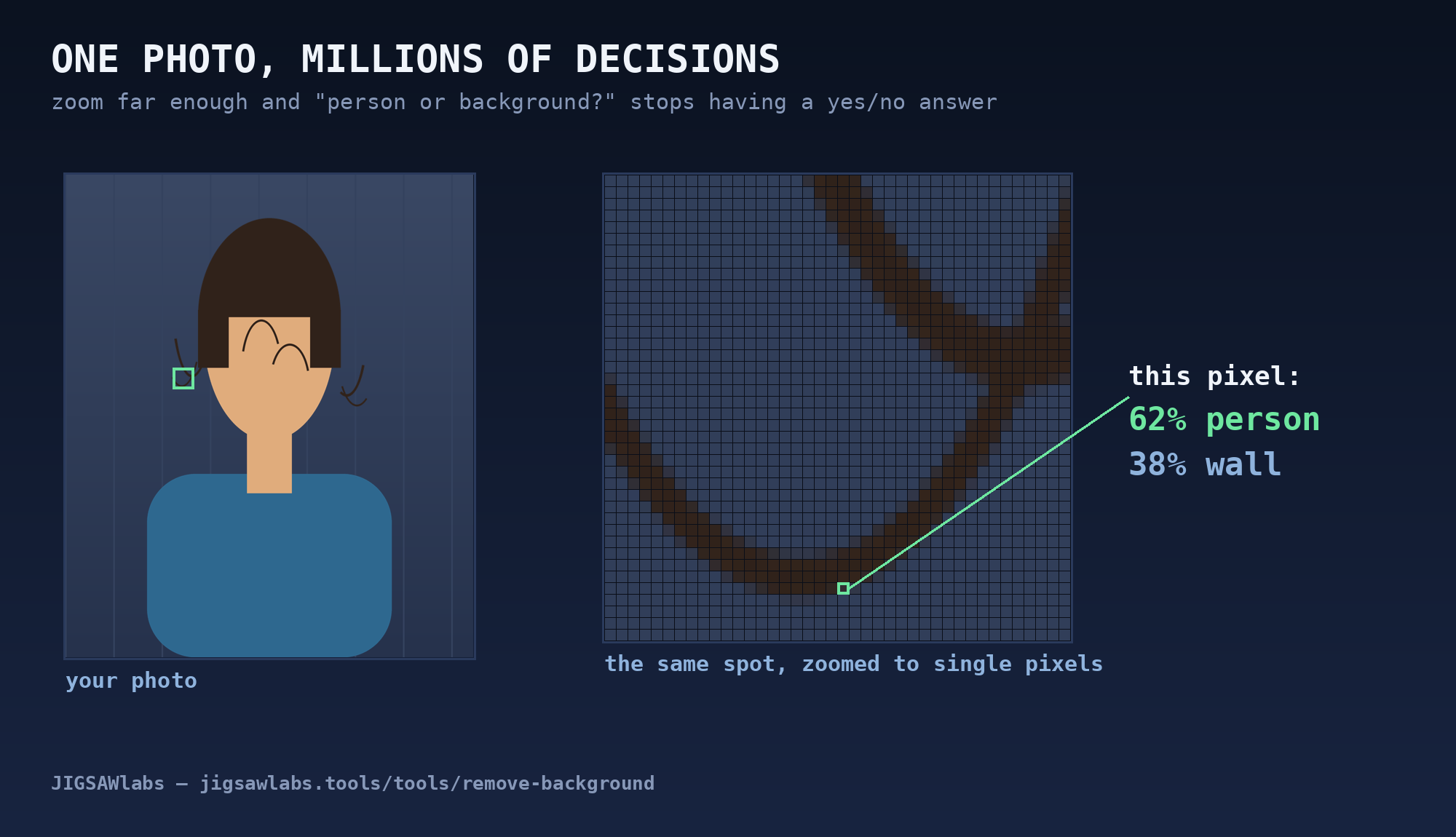
So the real question the tool must answer, twelve million times over, is not "person: yes or no?" but "person: how much, from 0% to 100%?" Get those percentages wrong and you get the look everyone recognizes from cheap cutouts: helmet hair, jagged halos, edges that look scissored by a hurried child.
Answering a percentage question millions of times, correctly, in a couple of seconds, on your own device — that is the whole story of a background remover. The rest of this post is just: how?
Step 1 — What the AI actually draws: the alpha matte
Here is the surprise that unlocks everything else: the neural network never cuts anything. It cannot delete pixels, and it never touches your photo.
It draws a second image.
That second image is the same size as your photo, but it's a ghost: pure grayscale, no colors. Each of its pixels holds exactly one number — the answer to the question above for the matching pixel of your photo. White means 100%: "this pixel is fully person." Black means 0%: "fully background." And the grays in between are the whole reason this works: a middle gray at the edge of a curl means "this pixel is about half hair."
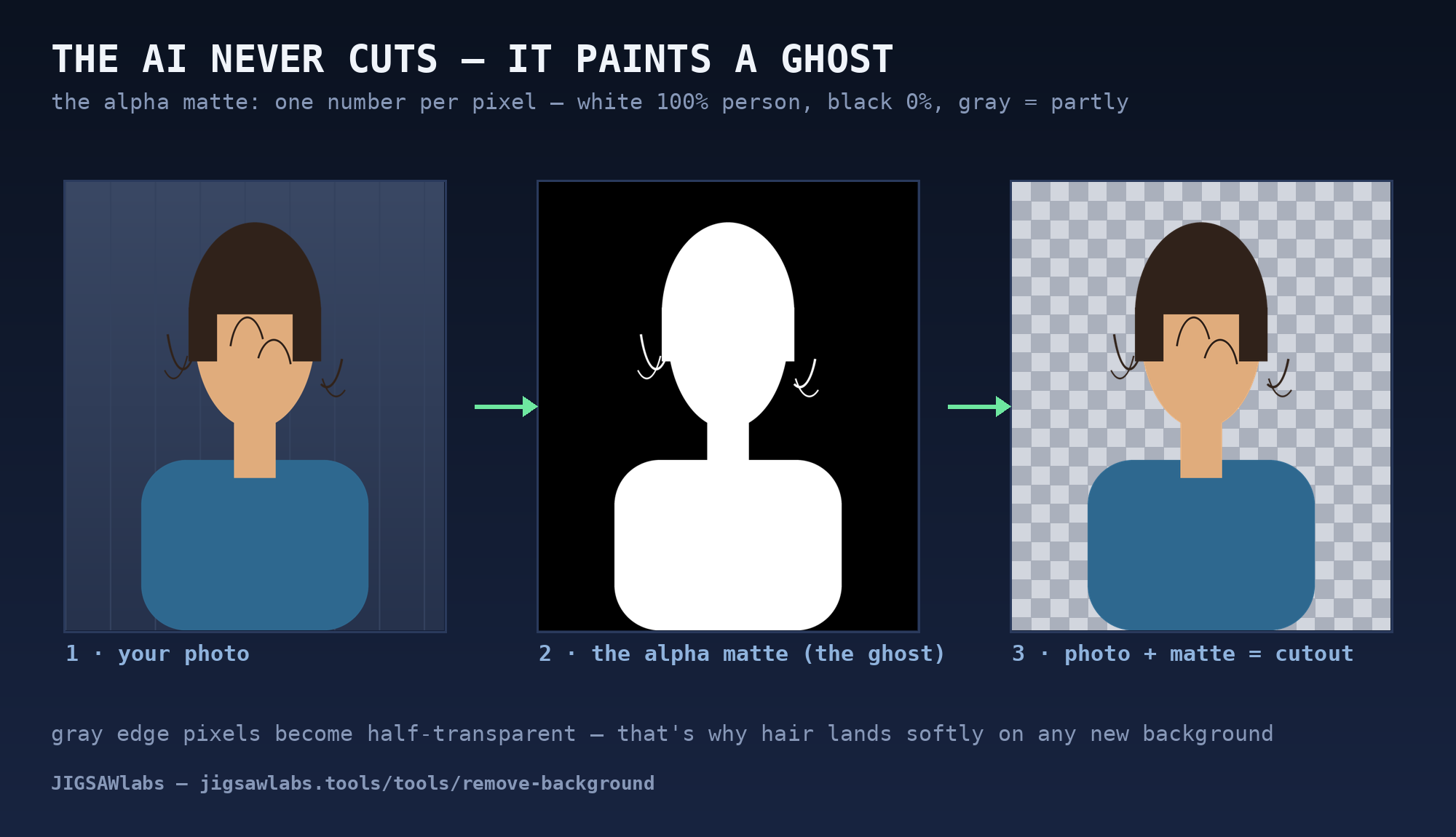
This ghost image has a name: the alpha matte. The word matte is older than computers — it comes from cinema, where artists painted mattes on glass to block out parts of the frame, long before green screens. The film industry's problem a century ago was exactly ours: how do you say, for every point of the picture, how much of it belongs to the foreground?
Once you have the matte, "removing the background" stops being intelligent work at all. Your photo supplies the colors; the matte supplies the percentages; gluing them together as an image-with-transparency is one mechanical pass. The person keeps her exact pixels — every strand at 100% — and each half-hair edge pixel becomes half-transparent, which is what lets it sit softly on whatever comes next: pure white for a passport photo, a beach, anything.
So when you tap the button, the intelligence has exactly one job, and it is weirdly artistic: stare at a photograph and paint its ghost — 12 million careful shades of gray. Everything after that is arithmetic.
Step 2 — How the ghost-painter thinks: two artists, one canvas
Meet the painter. The tool on jigsawlabs.tools uses a neural network called MODNet — a design that came out of university research on portrait matting, and the same network we ship to your browser. What makes it worth explaining is that its inner structure mirrors something you already do with your own eyes.
Look at a portrait and squint. Details vanish; blobs remain. Even blurred, you know exactly where the person is — a squint is enough for the shape. Now lean in close to one spot — say the boundary of a shoulder. Up close you can trace the edge precisely — but if I only ever showed you that zoomed patch, you couldn't tell me whether it belongs to a shoulder or a shoe.
Those are two different skills, and they fail in opposite ways. So MODNet is built, literally, as two artists sharing one canvas:
The squinter works on a shrunken copy of your photo. Detail is gone, so it can only judge the big picture — and that's the point. Its half of the job: paint a rough, blurry silhouette. The person is HERE. It is wise about "where" and hopeless about "exactly."
The edge-tracer works close to full resolution, but only cares about a narrow band of the image: the boundary region the squinter pointed at. Along that band it does the delicate work — the strands, the soft blur where a curl meets the wall, the gap between arm and body. It is precise about "exactly" and clueless about "where."
A third stage — call it the editor — merges the two: the squinter's silhouette everywhere, the edge-tracer's fine grays wherever the two overlap, one clean matte out. (In the research paper these are the semantic, detail, and fusion branches; the paper's real contribution was training all three to cooperate in one pass, fast enough for real time.)
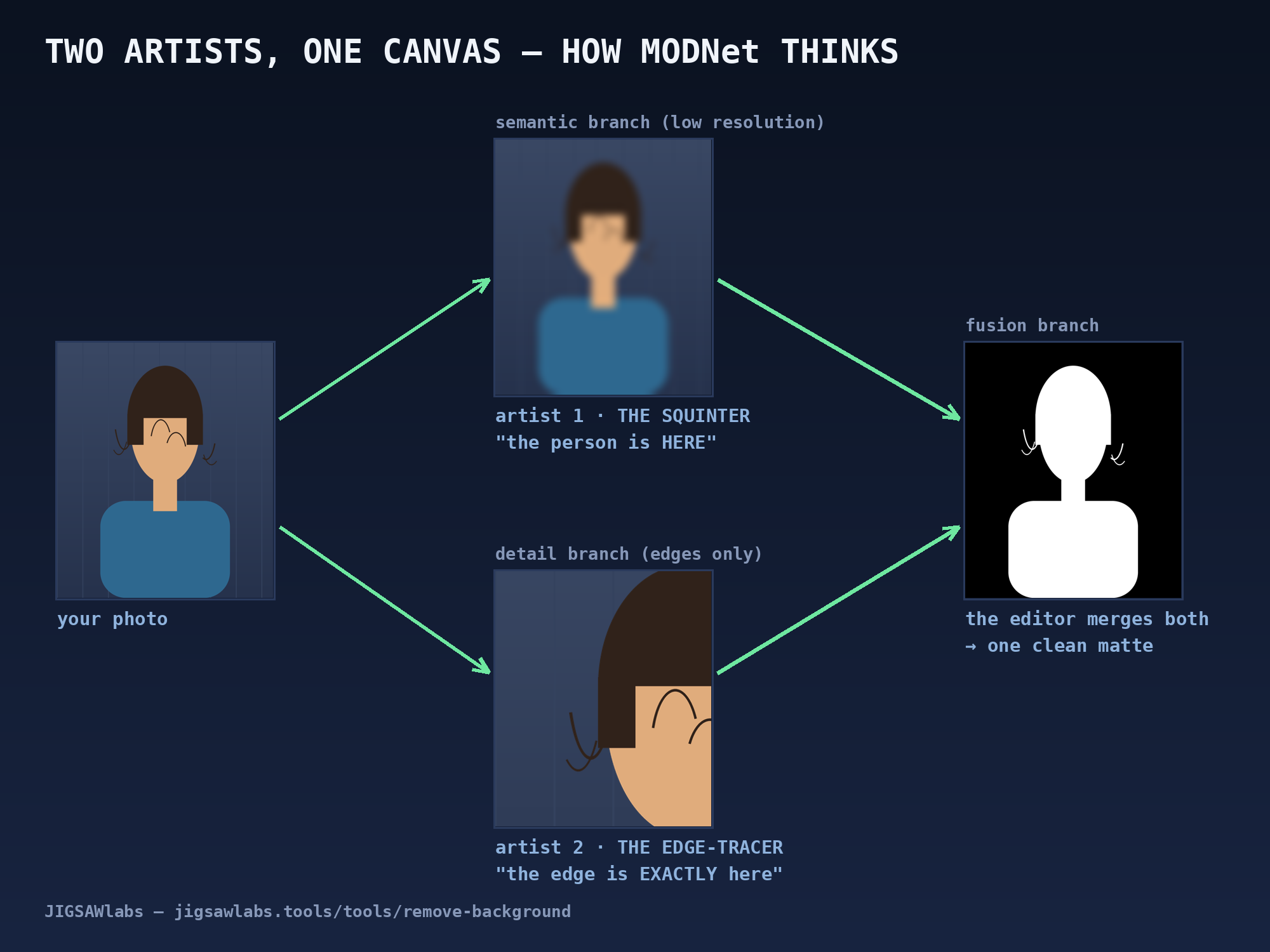
Here's the sentence worth remembering from this whole section: the network doesn't succeed because it's huge — it succeeds because the problem was split the way vision actually works. Shape is a low-resolution question. Edges are a local question. Neither needs the other's data, so neither wastes capacity on the other's job.
And how did the artists learn their crafts? The boring, honest answer: practice. The network was trained on many thousands of portrait photos that came with hand-made, pixel-perfect mattes — guess, compare, adjust, millions of times, until its guesses stopped being guesses. There is no rulebook inside that says "hair is thin and wispy"; there are only numbers that drifted, example by example, toward painting good ghosts.
Step 3 — The whole trick is one line of math
I promised math, and here it is — the entire "put me on a beach" feature, the same line our tool runs for every pixel:
new pixel = α · person + (1 − α) · new background
That α (alpha) is the matte's number for this pixel, written as 0-to-1 instead of a percentage. Read the line aloud and it turns out you already knew it: take α parts of the person, fill the rest with the new background.
Watch it work on three pixels:
- A pixel in the middle of the face: α = 1. The formula collapses to new = person. Untouched — which is why nobody's cheek ever gets "processed."
- A pixel of open sky in the new background: α = 0. It collapses to new = background. Pure beach.
- And the pixel from the start of this post — the one that was 62% hair over a wall: α = 0.62. The result is a real mix: 62% of the dark hair color plus 38% of whatever now sits behind — sky blue, passport white. The formula manufactures exactly the in-between color your eye expects at a soft edge. That's the whole secret of hair that doesn't look scissored: the edge isn't preserved, it's recomputed against the new background.
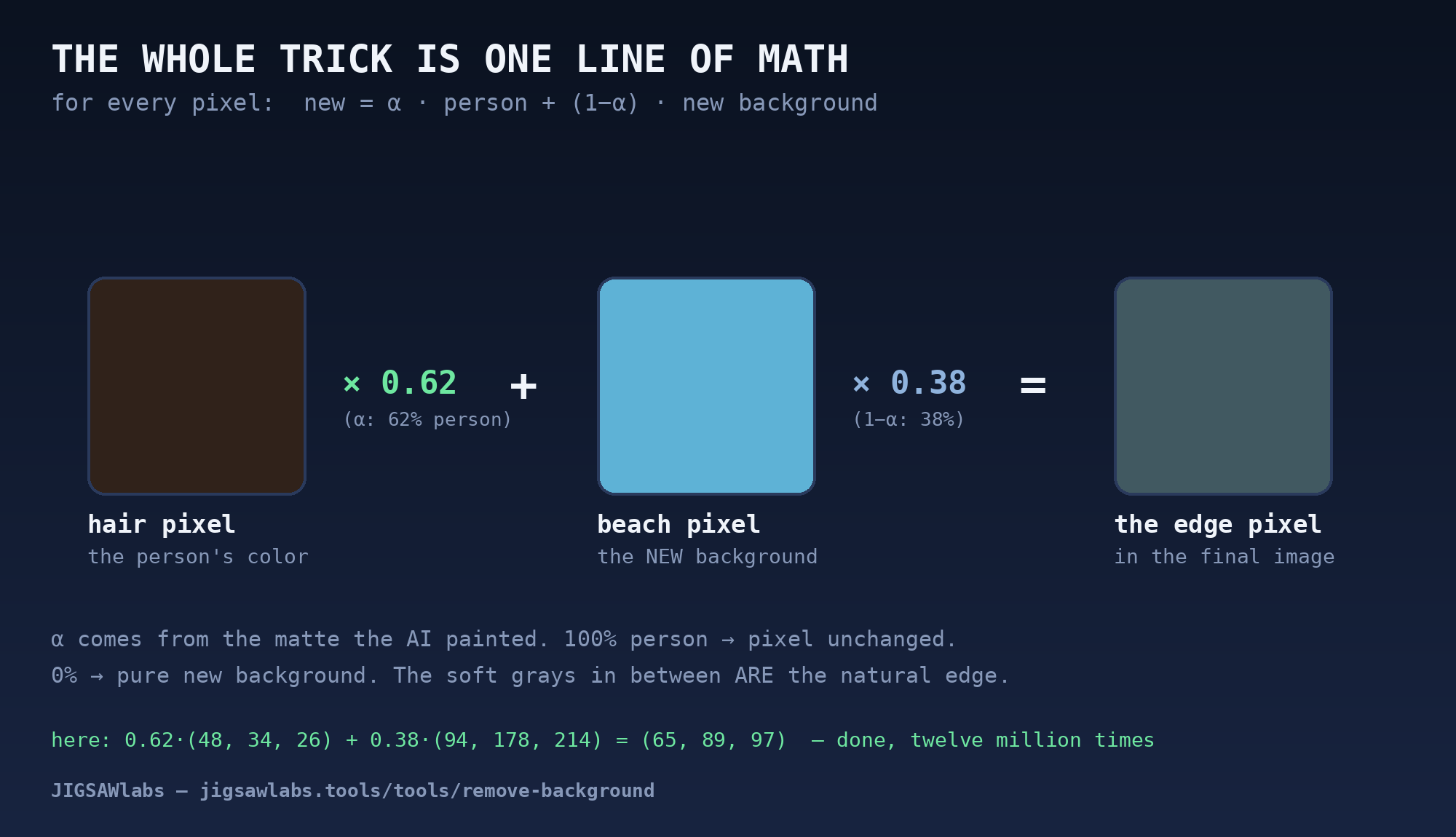
Want to feel it instead of reading it? We built a tiny playground where you drag α and the equation computes live: the alpha compositing playground — it runs the exact line above on colors you pick.
One line, three multiplications and an addition per color channel, twelve million pixels — your phone does it in the blink of a frame. The film industry has a name for this too: alpha compositing, formalized back in 1984 by Porter and Duff, and it is quietly running under every movie green-screen shot, every game HUD, every translucent window on your screen. Our tool didn't invent the glue; it earned the α.
And that's a clean split worth saying out loud: the neural network's ONLY job was those α values. Everything visible after that — remove, replace, passport white — is this one honest line of arithmetic.
Step 4 — The pasted look, and the statistics that fix it
Perfect edges are not enough. You have seen the proof a hundred times: a cutout with flawless hair, dropped onto a sunny beach — and still, instantly, unmistakably pasted. Why?
Because light is a liar you can't un-hear. The original photo was taken under warm indoor lamps; the beach is cool, bright, blue-shifted. Every pixel of the person still carries the fingerprint of the old room, and your eye — superbly trained by a lifetime of real scenes — notices that the person and the place disagree about what the light is.
Here's the beautiful part: fixing this needs no neural network at all. It needs six numbers.
The color "mood" of an image is captured shockingly well by simple statistics: for each color channel, the average (is this image overall warm? dark? blue?) and the spread (are its colors muted or punchy?). Two numbers per channel, three channels — six numbers describe the light's fingerprint.
So to make a person borrow the beach's light, you shift their statistics toward the beach's statistics. For every pixel of the person, per channel:
new = (old − person_avg) × (scene_spread / person_spread) + scene_avg
Subtract the person's average (remove the old room's fingerprint), rescale by the ratio of spreads (adopt the scene's contrast), add the scene's average (put on the new light). This recipe is called Reinhard color transfer, published in 2001 — done in a color space built to match human perception, and twenty-five years later it remains the workhorse because it is instant, predictable, and has no moods of its own.
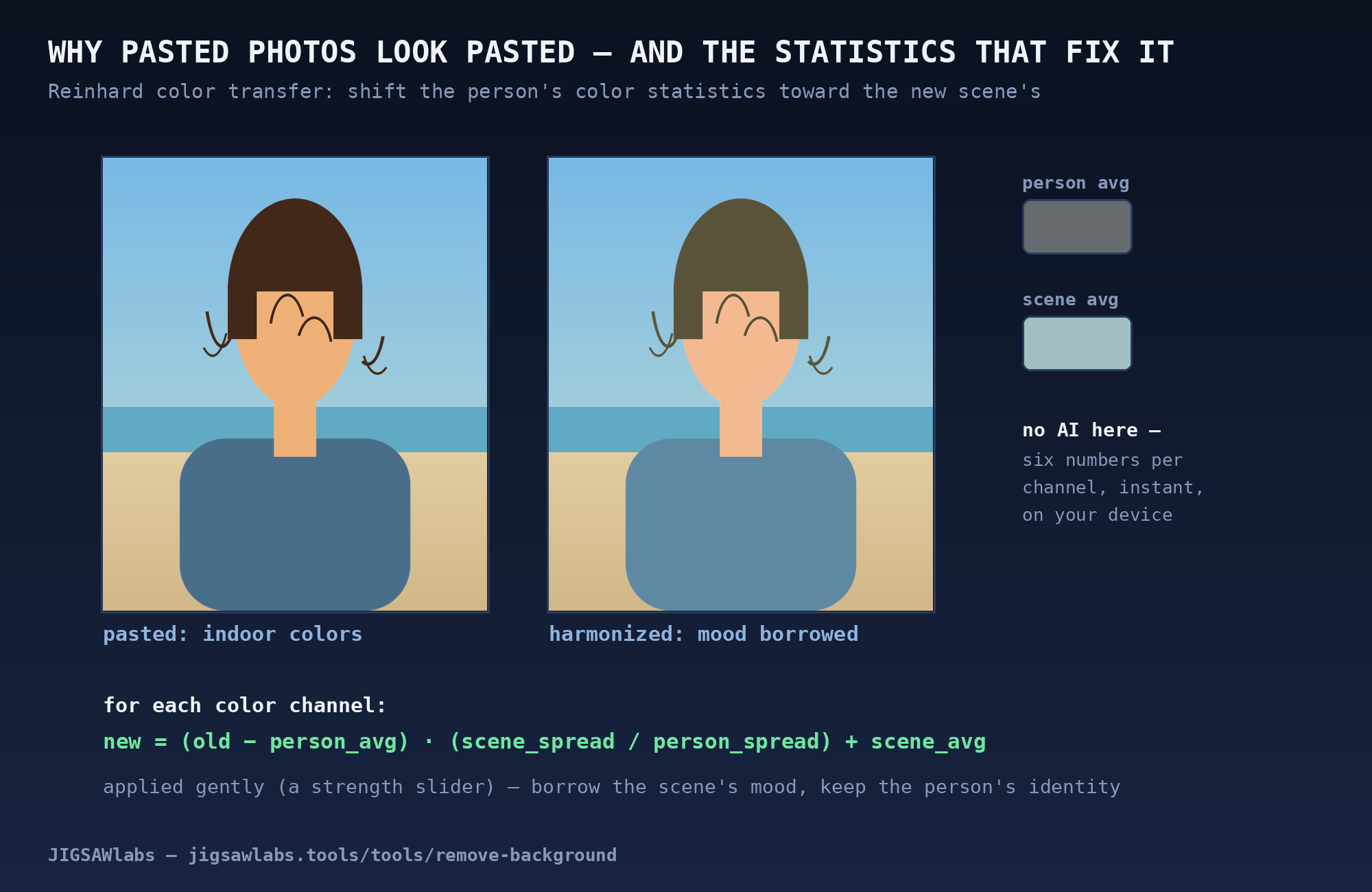
One ingredient matters in practice: gentleness. Match the statistics 100% and the person starts dissolving into the scenery — identity sacrificed to atmosphere. That's why our tool exposes it as a strength slider and applies the shift partially: borrow the scene's mood, keep your own face. (In the figure, even a one-third strength shift already makes the "pasted" feeling collapse.)
Step back and look at the full pipeline you now understand: a neural network paints the matte (Step 2), one line of arithmetic recomposes every pixel (Step 3), six statistics make the light agree (Step 4). The "magic" button is a matte, a multiply, and a mood.
The part nobody believes: all of it stayed in your tab
Now the twist that this whole series keeps arriving at from different directions.
Everything you just read about — the ghost-painting network, the twelve million compositing equations, the statistics of light — runs inside your browser tab. Not on our servers. We don't have servers that could do it. When you open the tool, the model travels to you — about six megabytes, once, cached like any image — and from that moment the pipeline runs on your own device. Open your browser's network panel and watch while it works: your photo never leaves.
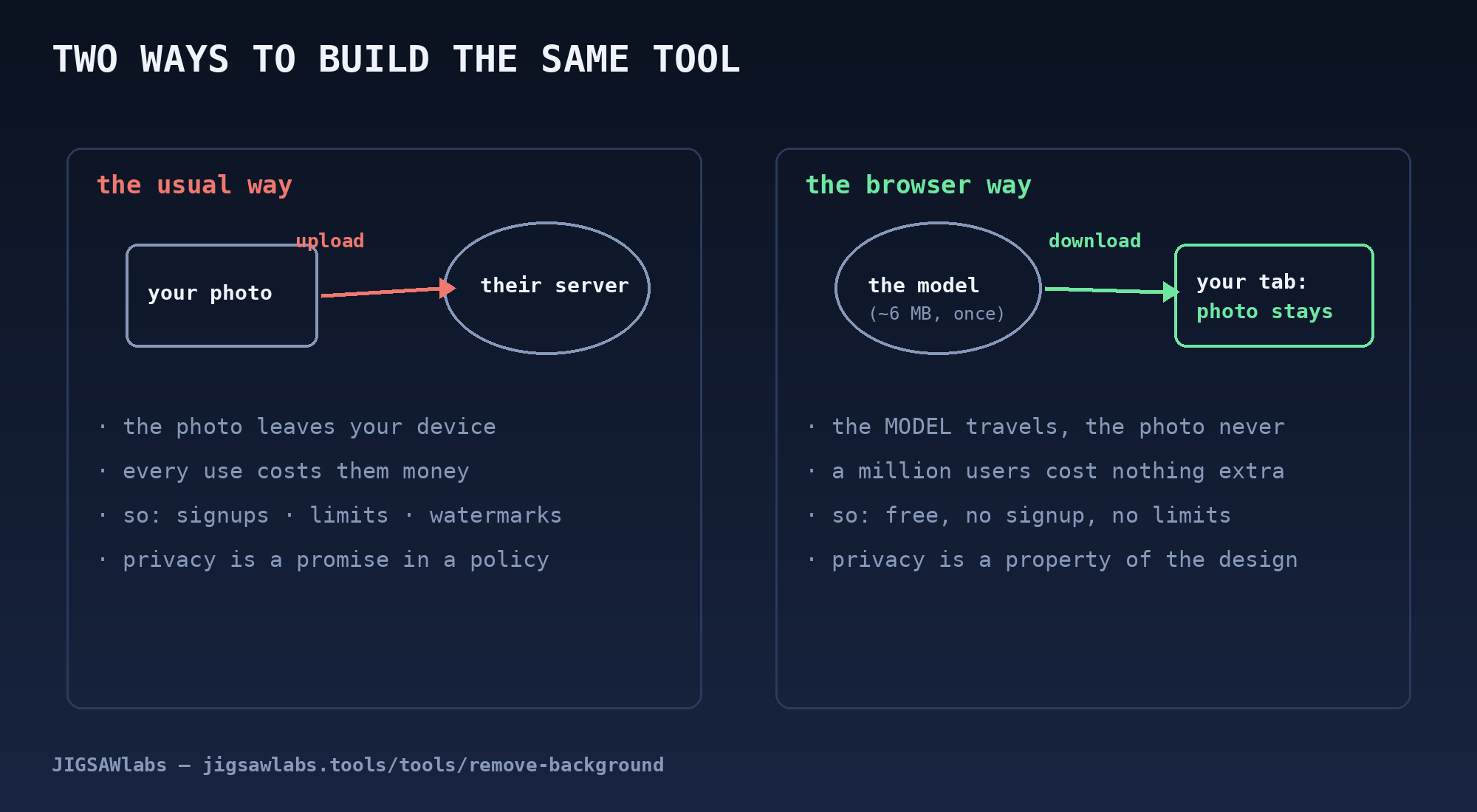
That one architectural choice quietly deletes the business model of an entire tool industry:
- Serving another user costs us nothing, so the tool can be free — no signup, no daily limit, no watermark held for ransom.
- Your photo was never sent, so privacy is not a promise we make — it's a property of the design. There is nothing to leak, subpoena, or train on.
The usual way and the browser way differ by a single arrow: either your photo travels to the intelligence, or the intelligence travels to your photo. Everything else — the paywalls on one side, the privacy on the other — is downstream of that arrow's direction.
Try the whole pipeline yourself — drop a photo, watch the matte do its work, slide the harmony strength and see Reinhard's six numbers move a person between worlds: jigsawlabs.tools/tools/remove-background — free, no signup, and your photo stays yours.
This is the second post in a series on the engineering inside JigsawLabs tools. The first — What If We Gave the Browser a Small Brain? — explains the 55 KB neural network that formats documents.
Everything we write about, we build. Free tools that run in your browser — your files never leave your device.
Try the free tools