
What If We Gave the Browser a Small Brain?
Here is a question that has been quietly haunting me:
What is a browser actually capable of?
We treat it as a window — a pane of glass we look through at software running somewhere else. Every "intelligent" thing we do online follows the same ritual: our words, our photos, our files travel to a distant computer, something happens there, and the result travels back. The browser just displays it.
But the device you are reading this on is a supercomputer by any historical standard, and the browser is the most widely deployed runtime in human history — sitting on billions of machines, capable of running real computation, and mostly used to render other people's servers.
So the question sharpens into something more interesting:
What if we gave the browser a small brain? Not a connection to intelligence somewhere else — an actual resident intelligence, living inside the page the way a stylesheet does. What power could we unleash on the devices we already own?
Hold that question. This post is about the first place it landed for me — and the surprisingly small amount of mathematics it took to answer it.
The first place the question landed: documents
I work with documents constantly, and like most people I don't produce them in one sitting — I produce fragments. Meeting notes on a laptop. Half an outline dictated into a phone. Bullet points pasted from three chats. And every few days comes the moment where the scattered pile has to become a presentable document: a real one, with a cover page, headings, numbered sections, a table that looks like a table.
The gap between "text I have" and "document I can send" is tiny in theory and maddening in practice. So the haunting question turned concrete:
What if a browser tool could look at my scattered notes and understand — even a little — how they should be formatted? What if it lived entirely in the tab: nothing to download, nothing to install, no signup, no upload? How much friction would simply disappear?
Notice what the last part rules out. The tools that promise this today almost all work the same way: upload your text to our server, and our AI will handle it. That sentence deserves more suspicion than it gets. Notes contain client names, unreleased plans, half-formed ideas — a meeting summary is one of the most sensitive documents a person produces all week, and the standard workflow ships it to someone else's computer to get a cover page stapled on.
I wanted the intelligence to come to the document, not the document to the intelligence. The answer turned out to be a neural network with 6,471 parameters that weighs 55 KB — smaller than the favicon on some websites. I think of it as a small brain, and I've come to believe small brains are one of the most underrated ideas in software right now.
The landscape: cathedral AI
Today's defining AI systems are cathedrals: hundreds of billions of parameters, running in datacenters, reached through an API. They are genuinely remarkable, and for open-ended work — writing, reasoning, conversation — nothing smaller comes close.
But the cathedral model quietly became the default architecture for every intelligent feature, including ones that never needed it. Want to detect whether a line of text is a heading? Send the document to the cloud. The result is a strange bargain that we've all stopped noticing: to make text prettier, you surrender the text.
There's a second cost besides privacy: economics. Every cloud call costs the tool's maker money, which is why "free" document tools come with signups, watermarks, daily limits, and pricing pages. The paywall isn't greed, mostly — it's physics. Someone has to pay for the datacenter.
Flip the architecture and both costs vanish at once. If the intelligence runs on the user's own device, the marginal cost of serving one more user is zero — so the tool can actually be free — and the data never moves, so privacy isn't a policy, it's a property of the design.
The question is whether device-sized intelligence is enough for the job. For document structure, it turns out 55 KB is plenty. Here's why.
The problem, precisely
Take this fragment of a messy note:
QUARTERLY REVIEW
prepared by finance team

Revenue: 410K
Costs: 180K

next steps
- hire two engineers
- renegotiate hosting contract
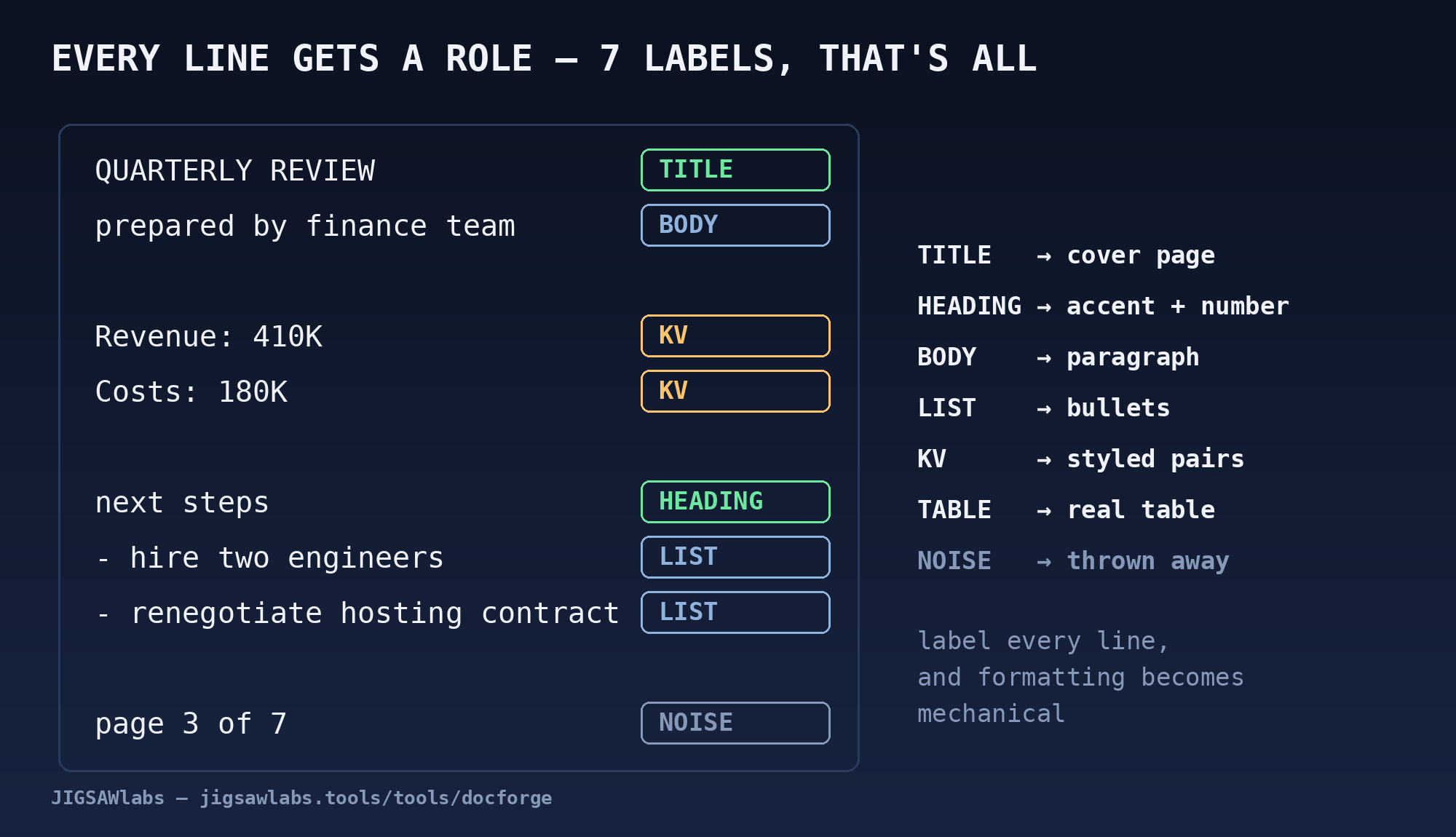
You parsed that instantly, without being told: a title, a byline, two key–value pairs, a heading ("next steps"), a list. Formatting a document is exactly this act of seeing structure — deciding, for every line, what role it plays. Once each line has a role, the rest is mechanical: titles get cover pages, headings get accent colors and numbering, lists get bullets, tables get borders.
So the whole intelligent part of the problem compresses into one question:
Given a line of text, is it a TITLE, a HEADING, BODY text, a LIST item, a KEY–VALUE pair, a TABLE row — or NOISE (page numbers, boilerplate) that should be thrown away?
Seven categories. That's it. This is not open-ended reasoning; it's a classification problem — and classification problems this small have been solvable since long before the cathedral era.
How the small brain works
You could try rules: "if a line is short and ends with a colon, it's a heading." Rules get you surprisingly far — and then betray you. Is Revenue 2024: a heading, or a key–value pair missing its value? Is a short capitalized line a title, or an angry sentence? Every new rule you add to fix one case breaks another. Rule systems don't degrade gracefully; they argue with themselves.
The alternative is to let the boundaries be learned from examples. Here's the entire recipe — this is genuinely all of it:
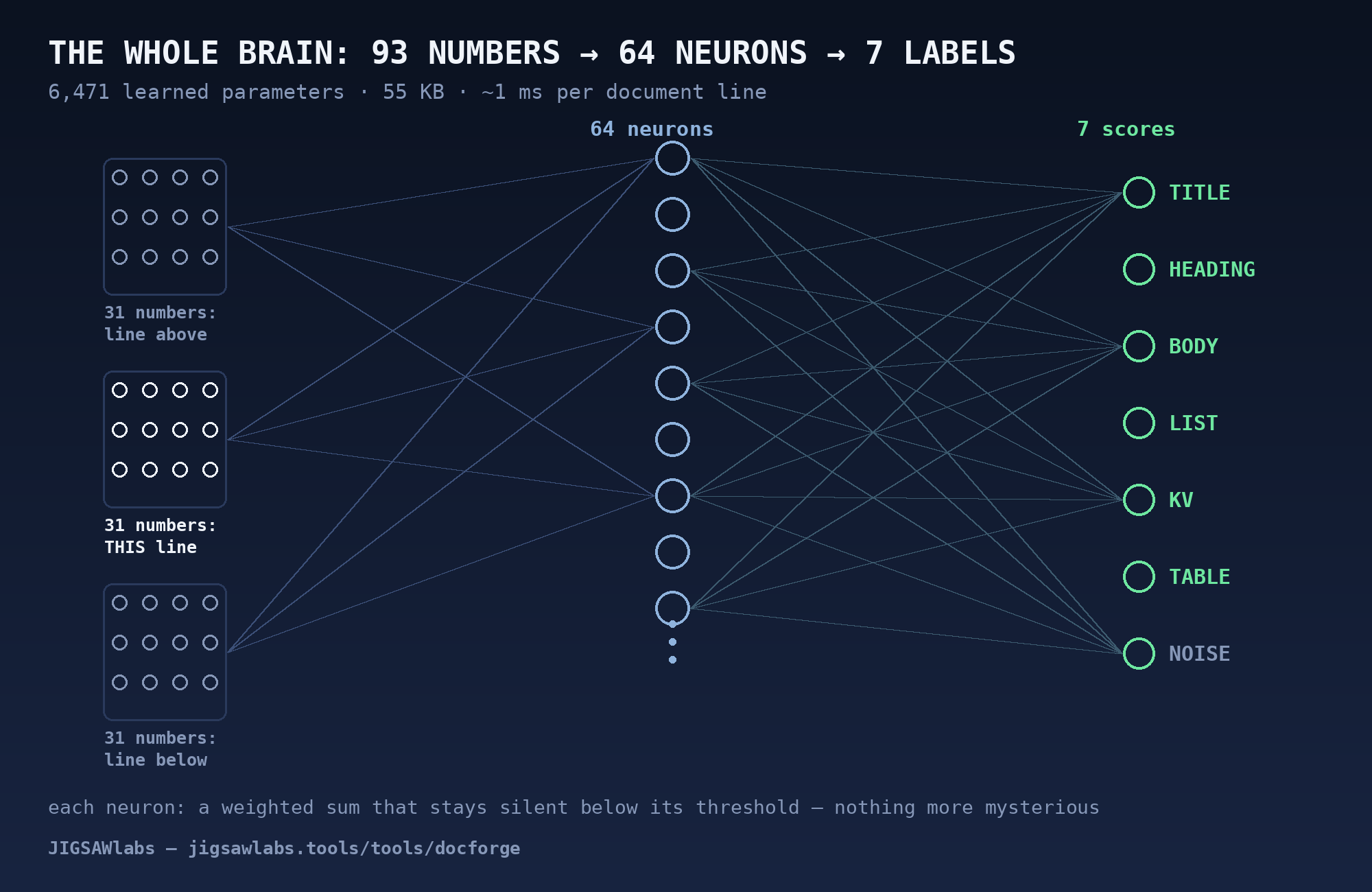
1. Measure each line. The model never sees words. Each line is reduced to 31 numbers — honest, human-readable measurements: How long is it? What fraction is digits? Does it start with a bullet character? End with a colon? Is it ALL CAPS? Does it look like key: value? Is there a blank line above it? Whereabouts in the document does it sit?
2. Add context. A line alone can be ambiguous; a line between two other lines rarely is. (Revenue: 410K directly above Costs: 180K is clearly part of a key–value block.) So the model looks at each line together with its neighbors: 31 numbers × 3 lines = 93 inputs.
3. One layer of neurons. The 93 inputs feed 64 tiny decision units. Each one computes a weighted sum of everything it sees and stays silent unless the evidence crosses its threshold — a "neuron" is nothing more mysterious than that. Their 64 outputs are combined into 7 scores, one per category, and the scores become probabilities.
That's the whole brain: 6,471 learned numbers. For comparison, the models behind chatbots have hundreds of billions. This one is roughly fifty million times smaller — because the question it answers is fifty million times narrower.
On held-out test documents it labels 99.8% of lines correctly. A tuned rule-based system reaches about 99.1% on the same test — so the honest claim is not that the network is magic, but that it cleanly wins the ambiguous cases where rules argue with themselves, and it never gets worse as it learns new document styles. (When it is unsure, the tool falls back to conservative formatting — a wrongly-bolded line is annoying; a deleted one is unforgivable.)
And because it's 55 KB of arithmetic, it classifies an entire document in about a millisecond, on a phone, offline.
What this makes possible
This architecture became DocForge, a free tool I built: paste text (or Markdown), pick a template, and it assembles a finished Word document — cover page, styled headings, tables, even rendered diagrams — entirely inside your browser tab. Open DevTools while it works and watch the network panel: nothing is transmitted. There's no server to upload to; the "AI feature" is those 55 KB, cached with the page.
The consequences are exactly the two from earlier, now running in reverse:
- It's free without a catch, because a million users cost the same to serve as one: nothing. No accounts, no watermarks, no "3 documents per day."
- It's private by construction, not by promise. No privacy policy can be violated for data that was never sent.
Back to the haunting question
So — what is a browser capable of? More than we let it do.
We treat "AI feature" as a synonym for "cloud feature", but a huge share of everyday intelligence — is this a heading or a list? is this photo's subject in focus? which language is this receipt in? — consists of narrow questions, and narrow questions have small answers. Small enough to ship with the page, like a stylesheet.
Imagine that as the default: spellcheck-sized brains embedded in every text box, image tool, and file converter on the web — each one specialized, inspectable, offline, and free, because it costs nothing to run. The cathedrals will keep doing what only cathedrals can do. But most of what we actually need from software intelligence, most days, would fit in a parish chapel — and the parish chapel fits in a browser tab you already have open.
The document-tools industry built paywalls on top of a cost structure that small brains simply delete. I don't think that industry has noticed yet. The power was on our devices all along; we just kept looking through the window instead of using the room.
DocForge is free, has no signup, and runs entirely in your browser: jigsawlabs.tools/tools/docforge. I build free, private, browser-based tools at jigsawlabs.tools — if this post's ideas appeal to you, that's where they live.
Everything we write about, we build. Free tools that run in your browser — your files never leave your device.
Try the free tools